Let families find you and book instantly
A public booking page that shows available slots, captures enquiries, and feeds your pipeline — branded to your school, no code required.
The Problem
Managing teachers shouldn't mean more admin
Coordinating availability, calculating pay, and controlling access — it's a full-time job on its own.
No online presence
Families search for music lessons and find competitors with booking pages. You rely on phone calls and word of mouth.
Manual scheduling for trials
Back-and-forth emails to find a time that works. By the time you agree, the family has booked elsewhere.
Enquiries lost
Someone emails asking about lessons. You reply three days later. They've already signed up with someone else.
Your 24/7 admissions office
A public booking page that captures enquiries and fills your pipeline while you sleep.
Slot booking mode
Show real-time available slots based on teacher availability. Families pick a time, fill in their details, and book a trial — conflict-checked automatically against existing lessons, time-off, and room capacity.
Enquiry-only mode
Prefer to schedule trials yourself? Switch to enquiry mode. Families submit their name, contact details, instrument interest, and a message. A lead is created in your pipeline for you to follow up.
Custom URL
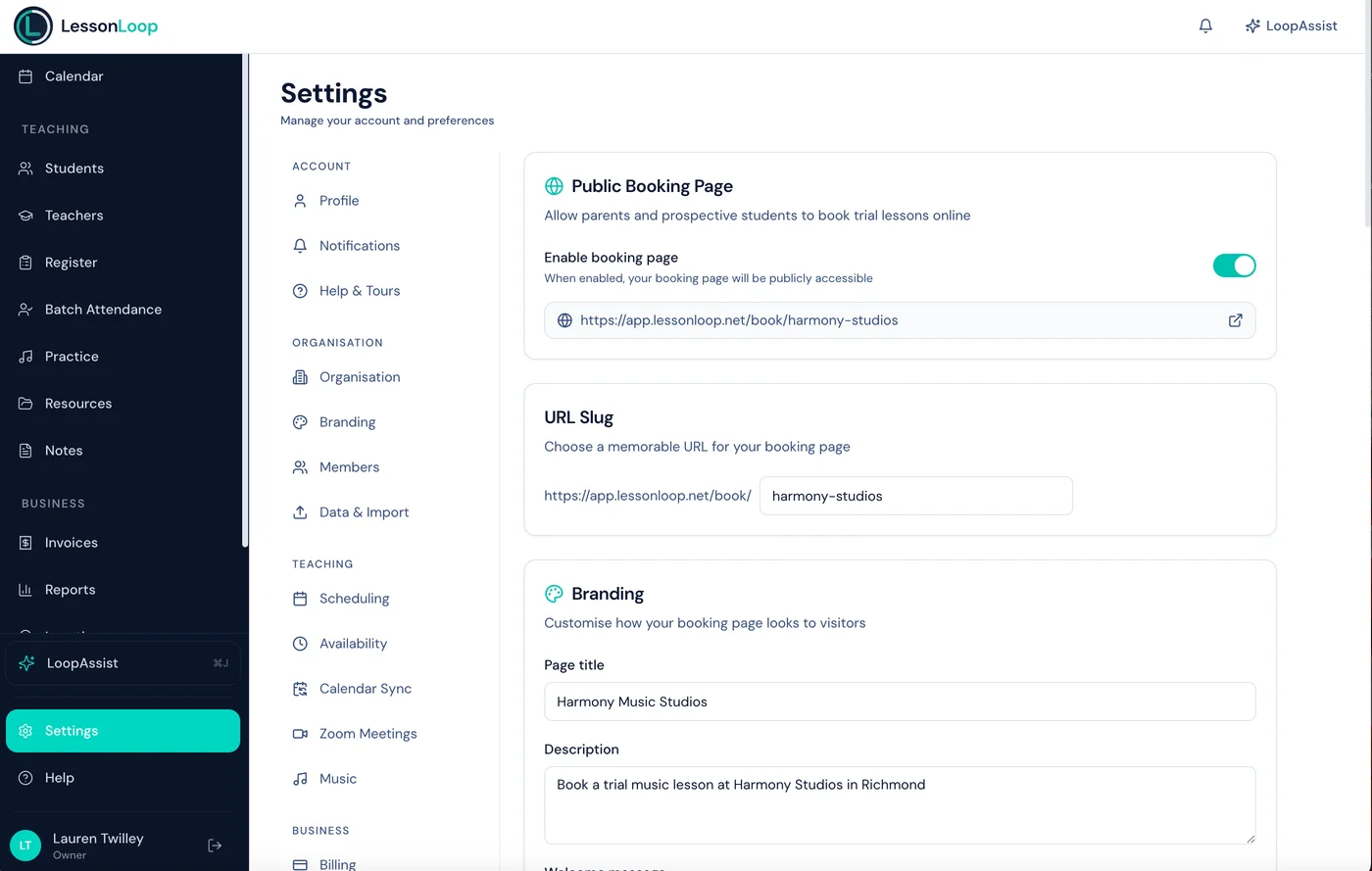
Each organisation gets a branded booking page URL — e.g. app.lessonloop.net/book/your-school-name. Share it on your website, social media, or Google Business Profile.
Privacy-first teacher display
Teacher selection shows first names only with opaque reference IDs. No last names or personal details exposed to the public.
Automatic conflict checking
Every slot shown is verified against existing lessons, teacher time-off, room bookings, and closure dates. Families only see genuinely available times.
Pipeline integration
Bookings and enquiries automatically create leads in your pipeline with the trial date, instrument interest, and contact details. Nothing falls through the cracks.
Configurable controls
Set a minimum notice period (e.g. 24 hours before a slot), buffer time between consecutive slots, and rate limiting (20 slot queries/min, 5 submissions/hour per IP) for security.
Instant notifications
When a booking or enquiry comes in, the parent receives a confirmation email and your admin team gets an instant notification.
Built for trust from day one
Your booking page is public-facing, so security matters. Every aspect is designed to protect both your school and the families who use it.
Rate limiting
20 slot queries per minute, 5 form submissions per hour per IP address — prevents abuse without affecting genuine families.
Privacy-first design
Teacher last names are never shown. Selection uses first names and opaque reference IDs only.
Real-time conflict checking
Every slot is verified against lessons, time-off, room bookings, and closures before being shown to families.
Security at a glance
20/min
Slot query limit
5/hour
Submission limit per IP
100%
Real-time slot accuracy
Zero
Personal data exposed
Up and running in minutes
Configure your page
Choose slot booking or enquiry mode. Set your URL slug, available instruments, and scheduling rules.
Share your link
Put it on your website, social media, or Google listing. Families can book or enquire 24/7.
Follow up from your pipeline
Every submission creates a lead. Book the trial, follow up, and convert — all from LessonLoop.
Frequently asked questions
What's the difference between slot booking and enquiry mode?
Can I customise my booking page URL?
Are the available slots accurate?
Do bookings create leads automatically?
Is the booking page secure?
Open your doors 24/7.
A branded booking page that captures enquiries and fills your pipeline while you sleep.